In this post we introduce HealthAdminBench (Bedi et al., ICLR 2026 Workshop), the first benchmark for evaluating LLM agents on healthcare administration tasks which collectively cost our economy over $1 trillion per year.
Developed in collaboration with a research team led by the Chief Data Scientist of Stanford Hospital, HealthAdminBench contains:
- 135 expert-designed tasks
- 4 realistic GUI environments (an electronic health record (EHR), two health insurance (payer) portals, and an eFax system)
- Task-level rubrics with 1,698 total criteria (12.6 criteria/task)
The best frontier models complete only 36% of tasks in our administratively-minded benchmark, despite now scoring 100% on saturated clinical benchmarks like the US Medical Licensing Exam (USMLE)
Our tasks cover a broad range of complex long-horizon workflows (~95 steps/task for our best model, Claude Opus 4.6) including three of the most economically valuable healthcare workflows: prior authorizations, denial appeals, and durable medical equipment (DME) ordering. These administrative tasks are challenging and require significant domain knowledge.
We also show that fine-tuning on high-quality domain-specific data can substantially improve performance on these tasks. As shown below, our fine-tuned Qwen-3.5-Kinetic-SFT model not only achieves +23% absolute improvement over its base model, but also outperforms the best closed source model (Claude Opus 4.6) on a held-out test set by +14%.
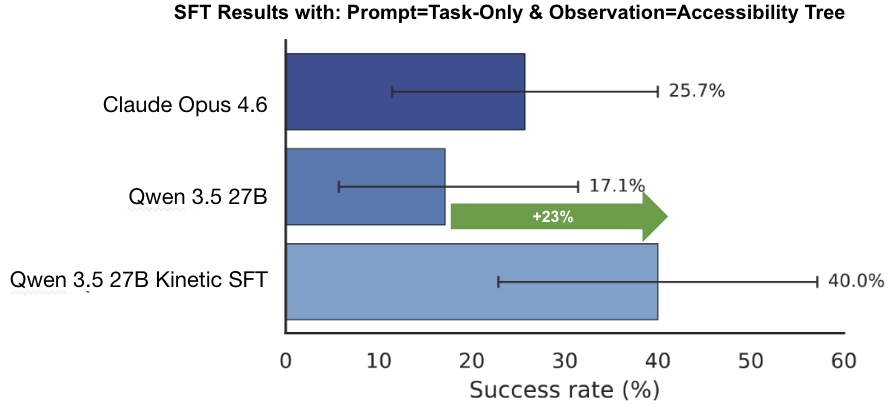
Figure 2. Fine-tuning results on a small held-out test set (n=35) from the benchmark. Here, we measure end-to-end task success rates under the accessibility tree observation mode and task-only prompting. Note that this is a different observation mode than the main results. Performance for both base models (Qwen 3.5 and Claude Opus 4.6) is out-of-the-box, with no fine-tuning or custom CUA harness.
At Kinetic Systems, we're building the datasets, evals, and AI agents needed to reliably solve these challenging, real-world healthcare workflows.
If you are a...
- Frontier lab looking for post-training data to help unlock the next big enterprise vertical; a
- Healthcare provider, BPO, or MSO drowning in back-office work seeking automation solutions; or an
- AI researcher passionate about solving the thorniest challenges facing our healthcare system
...then please reach out to team@kineticsystems.ai or schedule time here to see how we can work together.
P.S. We'll be presenting this work at the ICLR 2026 AIWILD Workshop in Rio -- if you're there in person, we'd love to connect!
The Trillion-Dollar Paper Chase
Administrative overhead in healthcare has tremendous economic and clinical costs.
We spend over $1 trillion per year on healthcare administration, and preventable medical error is the 3rd leading cause of death in the US.
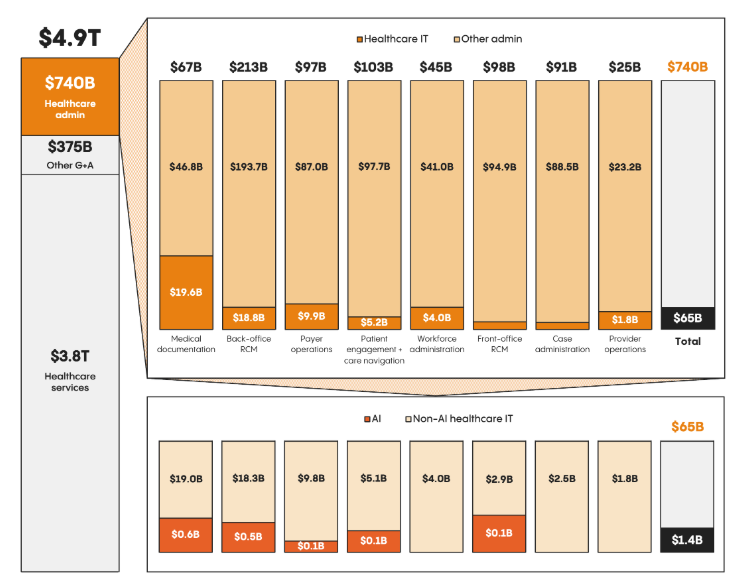
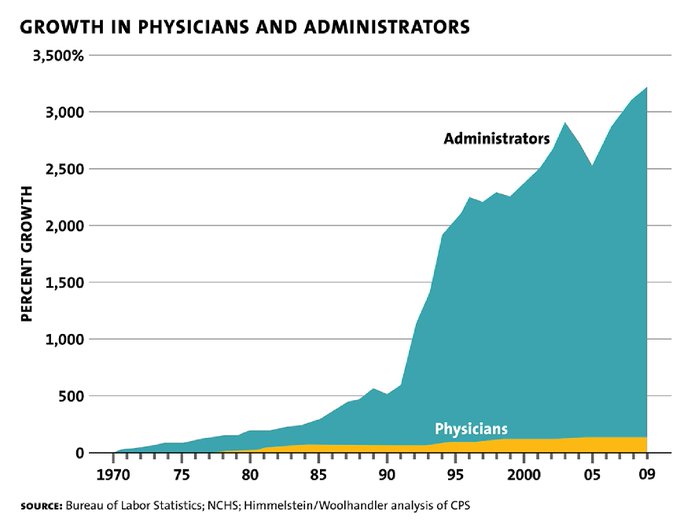
Figure 3. Left: The cost of healthcare administration is staggering. Right: Doctors alone simply can't keep up with the growing administrative burden, leading to an explosion in administrative positions at hospitals.
Frontier models like OpenAI's ChatGPT and Anthropic's Claude have made strong gains on clinically-relevant healthcare tasks. These models can now achieve a perfect score on the US Medical Licensing Exam (USMLE) and outperform physicians on difficult diagnoses.
But the unsexy, expensive, and necessary work of healthcare administration?
Still mostly untested. And that lack of evaluation makes it impossible for healthcare leaders to confidently back AI automation efforts or quantify the ROI of AI implementations.
Economically Valuable Work
Specifically, we focus our efforts on three of the most economically valuable administrative workflows:
-
Prior authorizations ($35B per year). A prior authorization is a request that a medical provider must submit to a patient's health insurance before rendering care in order to have it reimbursed. It is estimated that filing a single prior authorization costs between $20 - $30, and is routinely cited by patients as the biggest burden when getting care.
-
Denial appeals ($20B per year). After an insurance company denies a claim, a provider may submit an appeal. These appeals can be incredibly complex and time-consuming, costing hospitals an estimated $181 in administration costs per appealed claim. These aren't frivolous expenditures: the overall cost to providers of denied claims is roughly $260 billion per year, and Change Healthcare estimates that 63% of denied claims are recoverable, thus representing tens of billions of dollars just out of reach for cash-strapped hospitals. In fact, over 50% of hospitals in the US have more than $100 million sitting in accounts receivable for claims older than 6 months, money that is quite literally lying on the floor waiting to be picked up.
-
Durable medical equipment (DME) ordering ($70B market). Durable medical equipment (DME) is a broad category of reusable, doctor-prescribed equipment used by patients at home to manage illnesses or injuries. Common examples include wheelchairs, walkers, and CPAP machines. As roughly 80% of DME is ordered via fax, the process of ordering DME is a significant bottleneck for patients and providers, taking almost 25+ minutes per order.
The American Hospital Association now reports that administrative costs account for 40% of the cost of delivering care to patients. Manual labor is the most expensive component of these workflows, accounting for up to 90% of these costs.
While these costs are staggering, they simply represent the cost of doing business in healthcare in America.
AI agents that could automate all or parts of these manual workflows could thus generate hundreds of billions of dollars in value every year.
Computer Use Agents to the Rescue?
Computer-use agents (CUAs) are LLMs that can operate a computer just like a human – i.e. visually observing the screen and clicking, typing, and scrolling.
No custom APIs or integrations are required.
Just turn on the computer-use agent, and it can immediately get to work.
This makes computer-use agents a perfect fit for automating healthcare workflows, as they typically involve legacy systems that were never designed for (or purposely designed against) providing APIs or programmatic access.
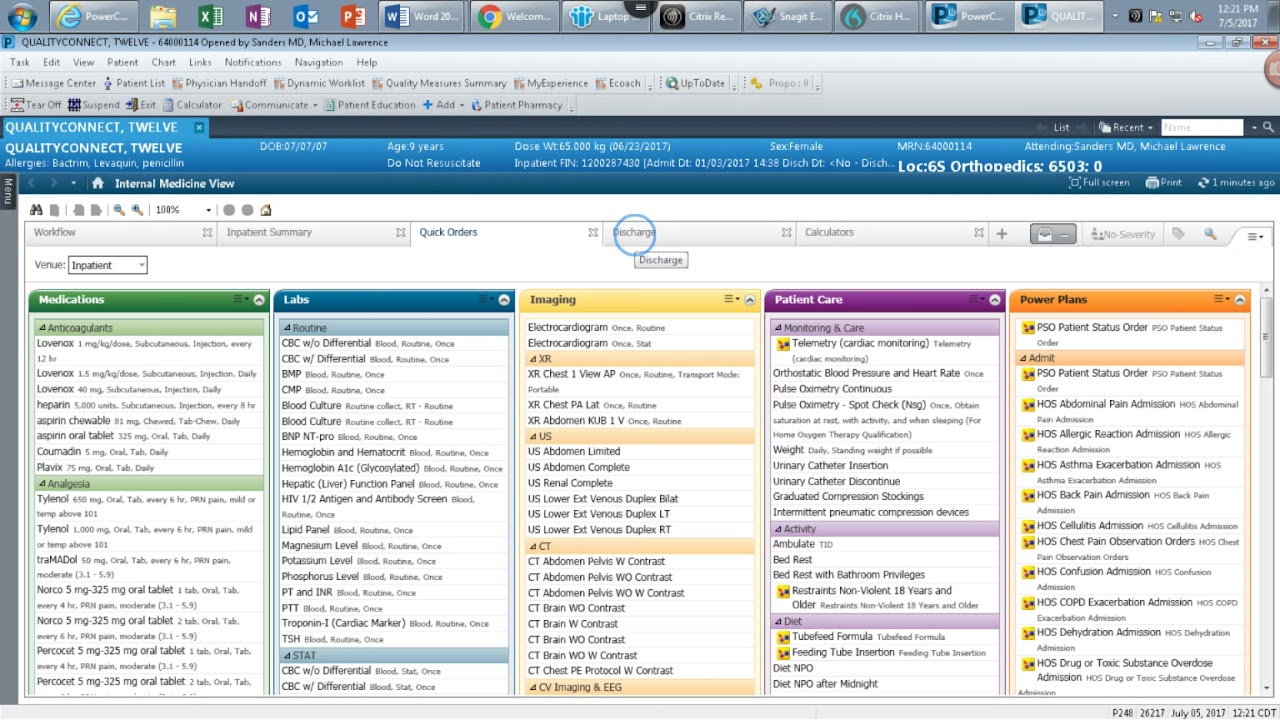
Figure 4. Example of an electronic health record (EHR) system. By legacy systems, we mean **legacy** systems.
The academic community has made rapid progress in developing and evaluating computer-use agents over the past couple of years. Reliable benchmarks exist for evaluating computer-use agents on consumer websites (Mind2Web, REAL, WebArena), simple desktop environments (OSWorld, WindowsAgentArena), and enterprise customer service workflows (WorkArena, Tau-Bench).
To our knowledge, however, no computer-use agent benchmark exists for healthcare tasks, despite the industry accounting for 18% of our GDP.
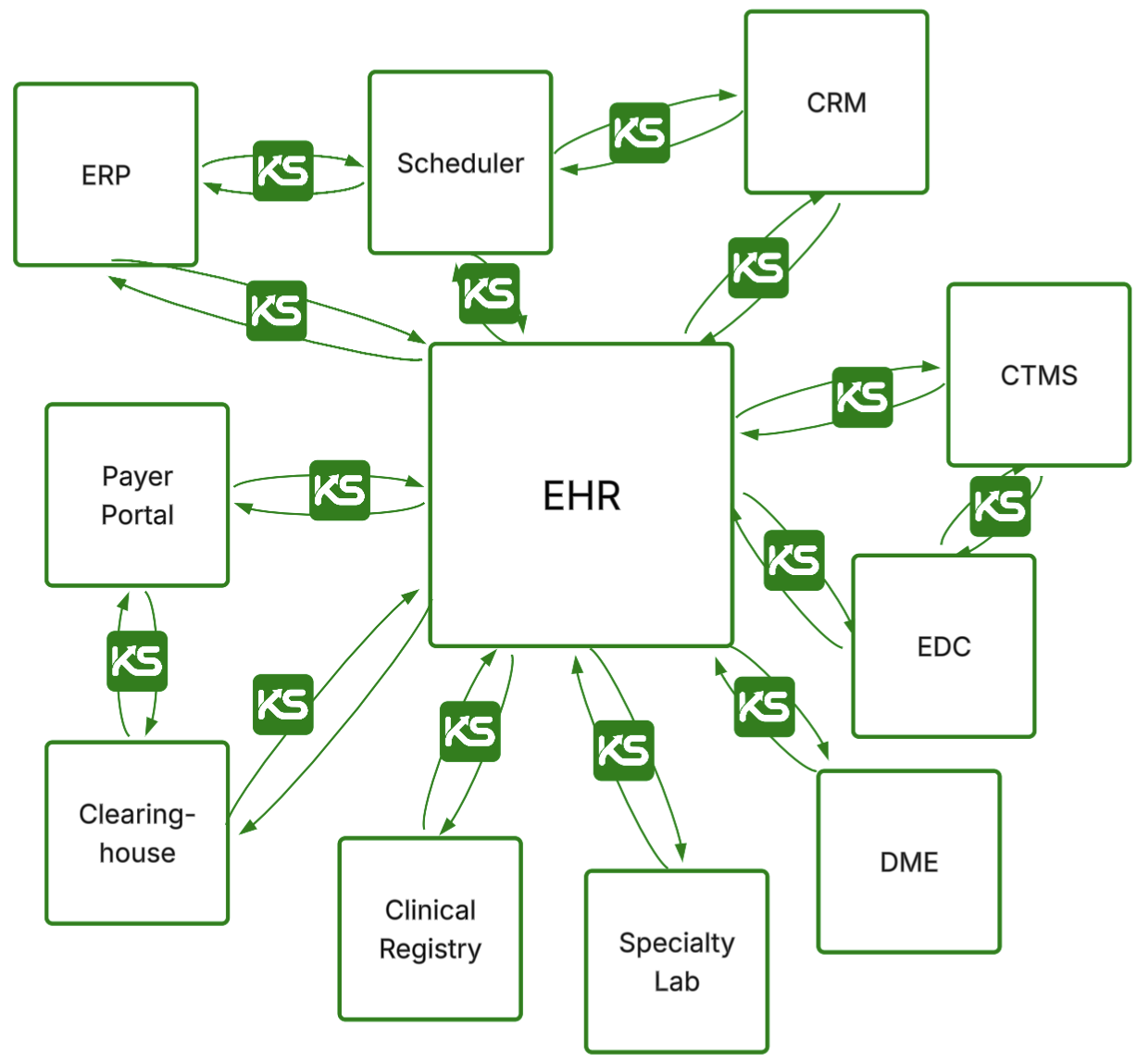
Existing benchmarks focused on healthcare (HealthBench, MedXpertQA, MedAgentBench, MedHELM, AgentClinic) primarily emphasize clinical reasoning and non-interactive, text-based tasks. They do not support computer-use agents, GUI environments, or administrative workflows, thus failing to capture what most staff actually do: coordinate across multiple disconnected systems under strict rules and task-specific policies that span chart review, eligibility verification, form completion, document handling, and careful documentation.
Healthcare administration isn't glamorous, but it's consequential.
And if LLM-based computer-use agents could reliably automate even a fraction of these workflows, the clinical and financial impact would be enormous.
At the same time, however, we have a limited understanding of the capabilities and limitations of AI agents on these tasks.
Healthcare decision makers charged with protecting patient safety are rightfully cautious about deploying such systems into production.
While we should not slow the speed of innovation given the immense potential of LLM-based computer-use agents to dramatically reduce the costs of care, we must have the proper safeguards and evaluations in place to ensure that we are accurately assessing the expected ROI and risks of implementation.
Thus, health systems and researchers that lead with sober benchmarks and evaluations, rather than hype, will be the ones that ultimately succeed.
Our Results: Healthcare Admin is Hard
So what did we find?
In short, healthcare administration is as hard for AI agents as it is for humans!
LLMs Struggle with Long-Horizon Tasks
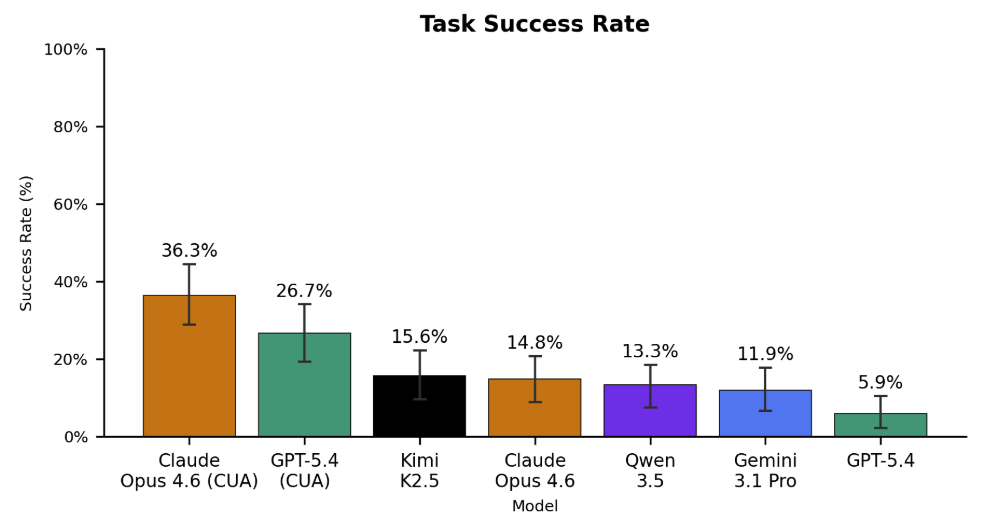
In our most realistic set-up (screenshot only observation, detailed prompting), the best-performing agent, Claude Opus 4.6 CUA, achieved only a 36.3% task success rate.
GPT-5.4 CUA came in a distant second at 26.7%, followed by the open-source Kimi K2.5 model at 15.6%, then Qwen 3.5 at 13.3%, and finally Gemini 3.1 Pro at 11.9%.
We define "task success rate" as the percentage of end-to-end tasks that the agent completed successfully. In other words, the agent must have completed all of the subtasks within a task correctly. On average, each task contains 12.5 subtasks.
Here, the label "CUA" means that we used the agent's purpose-built computer-use agent harness, which provides it with a richer set of tools and APIs to interact with the environment. Otherwise, we used our own standardized agent harness and prompt (see Github repo for more details).
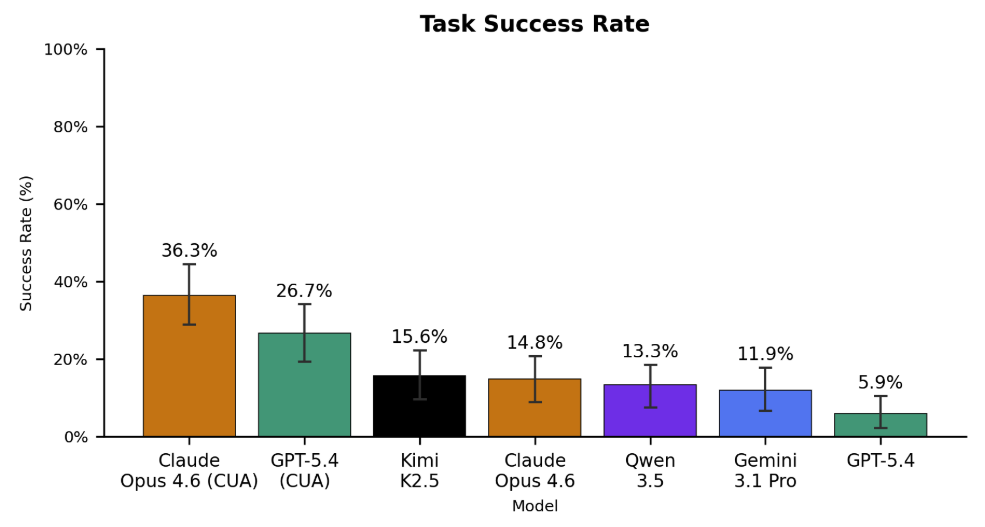
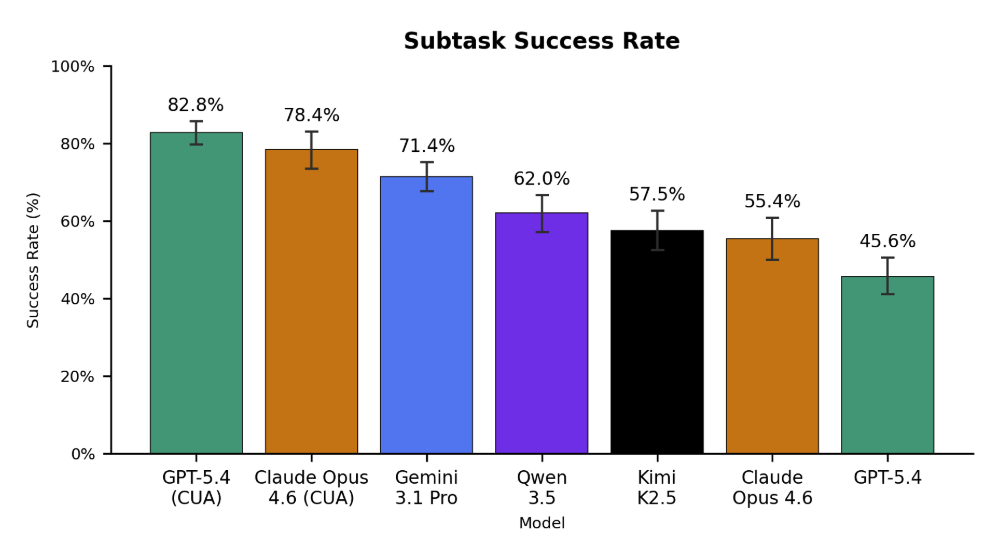
Figure 5. Left: End-to-end task success rates (n=135) across all evaluated models under the screenshot-only, informative prompting evaluation mode. No model scores above 40%. Claude Opus 4.6 and GPT-5.4 achieve the best performance when leveraging their custom computer-use harnesses (CUA), with scores of 36.3% and 26.7%, respectively. Gemini 3.1 Pro lags behind other frontier models, often giving up early and failing to complete tasks. Surprisingly, the open source Kimi K2.5 achieves the highest score among base models without CUA harnesses at a 15.6% success rate. Right: Subtask success rates (n=1698). Models are fairly capable of most individual steps – GPT-5.4 CUA completes 82.8% of subtasks correctly. As the average task contains 12.5 subtasks, this corresponds to roughly 2.3 errors per task.
Surprisingly, Kimi K2.5 achieved the highest score of any base model unaided by a custom CUA harness, suggesting that the model could perform significantly higher with the right CUA harness.
In addition to overall task success rates, we also measured each model’s performance on the 1698 individual subtasks (~12.5 subtasks per task). We report this as the "subtask success rate", which is the percentage of subtasks that the agent completed correctly (regardless of whether the overall task was completed successfully or not).
As shown in the figure above, models are fairly capable of most individual steps – GPT-5.4 CUA completes 82.8% of subtasks correctly.
But in healthcare administration, getting 82% of the right answer is failure.
These results suggest several points.
- Models are able to complete individual steps -- clicking, typing, and scrolling fairly accurately -- but lack the memory and domain knowledge needed to stitch these actions together into successful task completion. In other words, their understanding of a computer use task's syntax is correct (i.e. they are making fewer "grammatical errors" like misclicking a button), but the semantics are often wrong.
- The higher subtask success rates indicate that our benchmark could be used to train models to complete these tasks more accurately by leveraging these denser reward signals.
Finally, we perform pairwise comparisons between each model to identify which models are statistically significantly better than others (bolded rows).
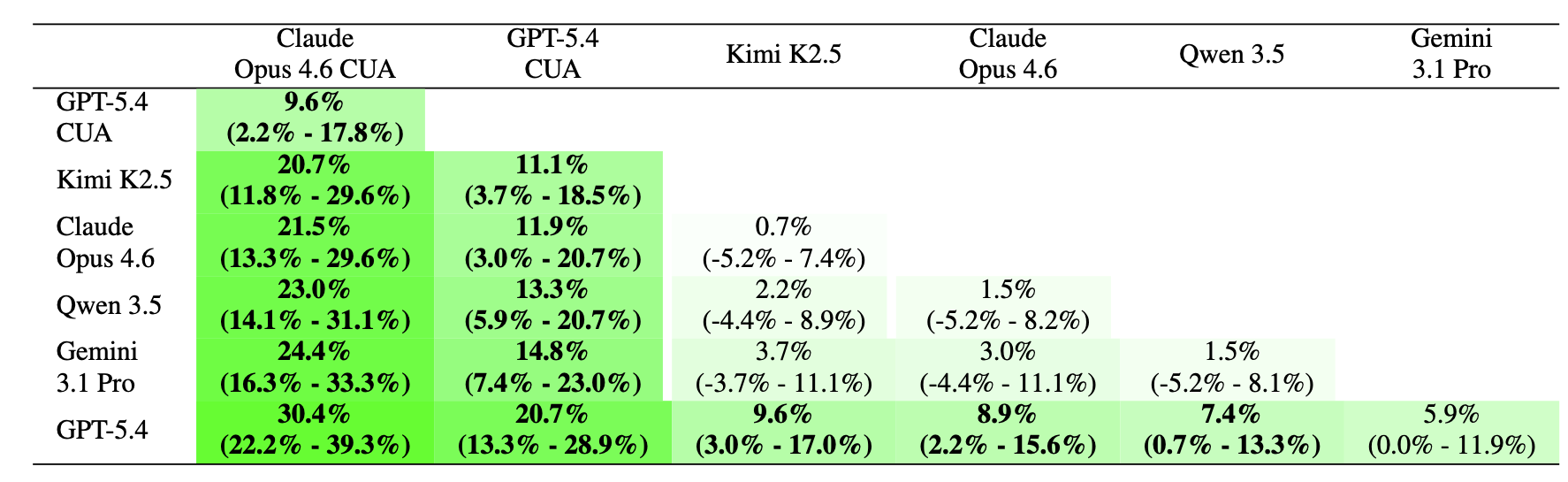
Figure 6. Head-to-head differences in task success rate (percentage points). Positive numbers indicate that the agent in the column is better than the agent in row. 95% test-set bootstrap confidence intervals are reported under the overall difference between agents. Bolded rows are statistically significant (p < 0.05).
We find that Claude Opus 4.6 (CUA) is truly head-and-shoulders above the pack, while Gemini 3.1 Pro lags behind most other frontier models.
LLMs Can Achieve Large Cost Savings
On average, it costs $20 - $30 to manually complete a single prior authorization, and an average of $181 per appealed claim.
In comparison, the cost of running our LLM-based agents was substantially cheaper (albeit at a significant decrease in accuracy, and within simplified task environments).
Open source models like Qwen 3.5 and Kimi K2.5 had a mean cost per task of <$1. If that held in real-world deployment, it would represent an order of magnitude savings over manual labor.
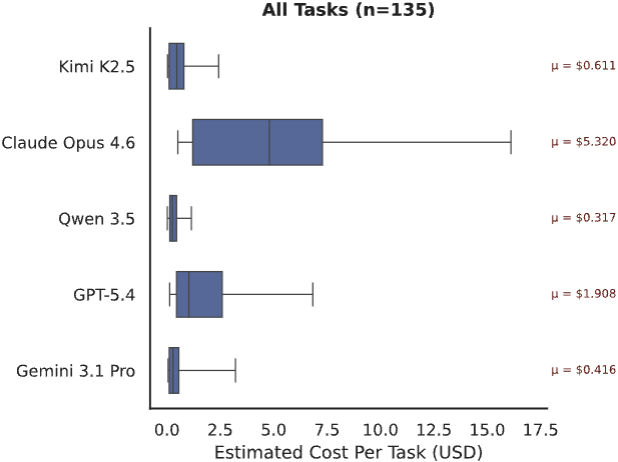
Figure 7. Cost ($) to execute each task (n=135). We calculate cost based on input/output tokens and the market price of each LLM at the time of experimentation. Open source models were called via OpenRouter.
Our most expensive model, Claude Opus 4.6, had an average cost of $5.32 per task, roughly 2.7x more expensive than the next highest model, GPT-5.4.
Gemini 3.1 Pro had a surprisingly low cost of $0.42 per task, almost 13x cheaper than Claude Opus 4.6. However, this is because it frequently gives up early on most tasks and fails. As the majority of our tasks are long-horizon, Gemini 3.1 Pro’s habit of prematurely quitting makes it seem significantly cheaper than it actually is (see Figure 10 below).
If LLMs are able to approach human performance on these tasks, then the cost savings could be substantial. However, significant work remains to improve the accuracy of these LLMs and evaluate them in more realistic settings.
Domain-Specific Post-Training Helps
We noticed that a key reason for the low out-of-the-box performance of frontier LLMs on our tasks is that they have limited prior knowledge of the specific policies needed to be followed to complete these tasks. For example, uploading a specific document early in a workflow that gets utilized dozens of steps later, or knowing which parts of an interface to click to get to the right next screen amidst 20+ seemingly viable options.
Thus, we hypothesized that fine-tuning models on a limited subset of representative golden traces could improve their ability to anticipate and execute the correct actions in longer sequences.
We randomly split our dataset into 100 training and 35 held-out test examples. We then fine-tuned an open-source model (Qwen 3.5 27B) using self-distillation on golden traces generated while it completed the 100 training examples. This led to our finetuned model Qwen-3.5-Kinetic-SFT. (NOTE: To reduce the time and cost of this experiment, we conducted it under the task-only prompting and accessibility tree observation mode, settings which are different than those used in the rest of this results section. This is why Claude Opus 4.6 performs higher under this evaluation than in the previous results. Thus, only the relative differences between models within this section are meaningful.)
Qwen-3.5-Kinetic-SFT achieves a task success rate of 40% on the held-out set, representing a +23% absolute improvement over its base model. More surprisingly, it strongly eclipses the out-of-the-box performance of the best closed-source model, Claude Opus 4.6, which achieves only a 25.7% success rate on the 35 held out tasks.
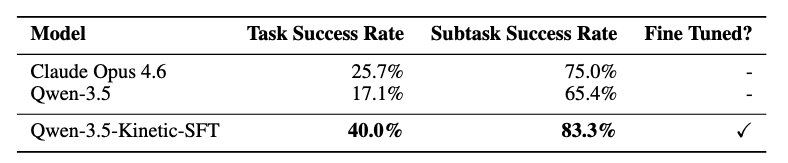
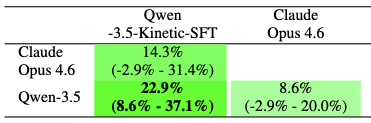
Figure 8. Left: Fine-tuning results on our held-out test set (n=35). Here, we measure end-to-end task success rates under the accessibility tree observation mode and task-only prompting. Note that this is a different setting than the main results. Performance for both base models (Qwen 3.5 and Claude Opus 4.6) is out-of-the-box, with no fine-tuning or custom harness. Right: Head-to-head differences in task success rate (percentage points). Positive numbers indicate that the agent in the column is better than the agent in row. 95% test-set bootstrap confidence intervals are reported under the overall difference between agents. Bolded rows are statistically significant (p < 0.05).
These results demonstrate the power of domain-specific operational knowledge.
Even modest amounts of highly targeted, domain-specific supervision – in our case, 100 examples – can substantially improve performance on complex administrative workflows, highlighting the importance of domain-specific workflow data and potential for models to adapt to niche enterprise domains.
Benchmark + Dataset
Over the past few months, we’ve been working with Stanford researchers to develop HealthAdminBench, the first benchmark for evaluating LLMs on solving realistic administrative healthcare tasks, with a particular focus on prior auths, denial management, and DME ordering.
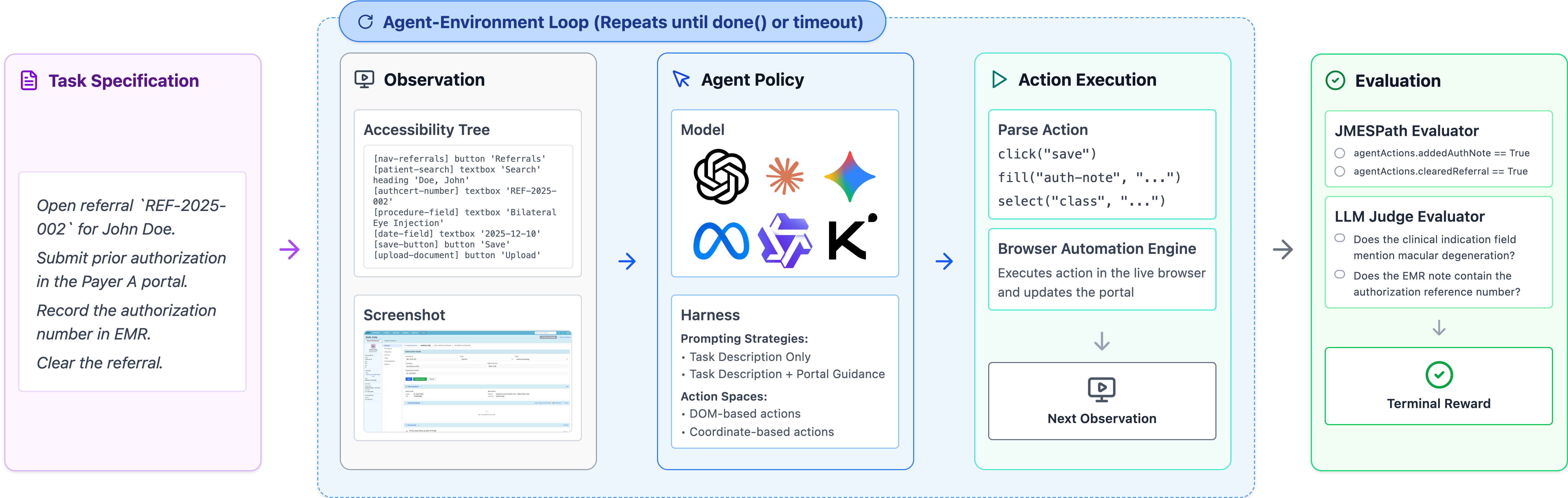
Figure 9. Overview of the benchmark. We worked with expert healthcare administrators from Stanford Hospital with decades of experience to help define the tasks, environments, and verifiers.
The benchmark contains 4 GUI environments, 135 tasks, and 1,698 verifiers developed in conjunction with domain experts with decades of real-world experience.
These are difficult, long-horizon tasks: the best-performing model (Claude Opus 4.6) takes an average of 95 steps per task before terminating.
And building this benchmark was difficult in and of itself. Healthcare systems are, almost by design, invisible to the outside world.
EHRs sit behind institutional firewalls. Payer portals require credentialed logins and vary wildly across insurers. Workflow documentation, if it exists at all, lives in internal knowledge bases and paper binders.
The standard playbook of building benchmarks by scraping the internet simply doesn't work in this setting.
To evaluate models on realistic healthcare administrative tasks, you need to build a benchmark containing realistic healthcare administrative tasks.
And to do that, you need to go to where the healthcare administrative tasks are. This means you need to:
- Partner with domain experts who live and breathe these workflows.
- Spend ~100 hours observing and documenting their workflows.
- Build realistic synthetic environments with realistic synthetic data to avoid PHI issues.
- Define interesting tasks that capture the nuances of these workflows.
- Create verifiers to automatically (and reliably!) evaluate the performance of models on these tasks (this is hard!)
- Conduct rigorous QC checks and iteratively refine the environments, tasks, verifiers, and data with domain experts.
- Beg our friends at Thinking Machines for Tinker credits.
- Evaluate a bunch of frontier models.
Environments
We built four realistic GUI web environments based on over 100 hours of observation of expert healthcare administrators at Stanford Hospital. All environments are publicly accessible at the links below:
- An EHR [link] (inspired by Epic) with modules for prior authorization, denials management, and DME ordering
- Two payer portals [link 1] [link 2] (inspired by Anthem and Availity) with distinct layouts and policies
- An eFax portal [link] (inspired by RightFax), because yes, healthcare still runs on fax.
We follow the methodology of REALBench and implement these environments as fully deterministic, sandboxed web applications with typed inputs, schema validation, policy checks, and realistic failure modes. We then seed each environment with realistic synthetic patient data to support task execution.
Tasks
We defined 135 tasks across three core administrative workflows:
- Prior authorization (60 tasks): Tasks range from verifying eligibility and documentation to submitting authorization requests via payer portals. More complex tasks require gathering EHR data (e.g., diagnosis codes, NPIs), completing structured forms, and occasionally performing clinical reasoning (e.g., dosage calculations or identifying submission-blocking errors).
- Appeals and Denials Management (60 tasks): Tasks involve reviewing denied claims, determining appropriate resolution (e.g., write-off, resubmission, appeal), and documenting findings. Harder tasks require interacting with payer portals, filtering workqueues, and handling ambiguous or high-value cases.
- DME Order Processing (15 tasks): Tasks involve retrieving required documentation from the EHR, submitting it to suppliers (e.g., via fax), and recording outcomes. More complex cases introduce constraints such as missing or invalid documentation that should block completion.
Tasks were designed and validated by revenue cycle management experts and care coordinators with decades of combined experience.
Task Complexity
We classify each task based on perceived difficulty (easy/medium/hard) and measure the number of steps that each model takes to execute each task. To reduce outlier token consumption, we set a maximum number of steps for each task difficulty level (the dotted red line in the below plot), so these numbers are slight underestimates.
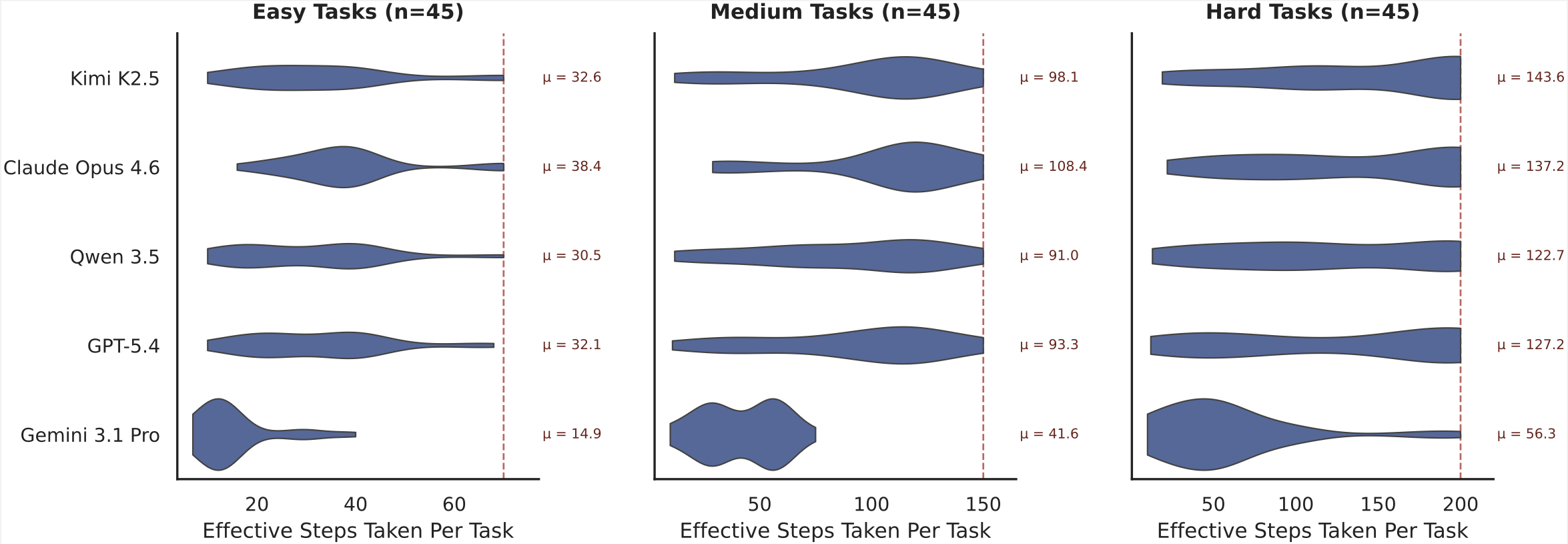
Figure 10. Number of "Effective Steps" per model across task difficulty levels (n=135). We define “Effective Steps” as a single conversational turn in which the model is provided with input and asked to take actions. Note that the above results include all model executions (successes and failures). The dotted red horizontal line shows the maximum steps allowed for each task difficulty level before the model is forced to stop. For these results, we do not include the CUA harness agents in order to provide standardized Effective Step counts across models.
On average, it takes Claude Opus 4.6 over 137 steps to complete the hard tasks in our benchmark, 108 steps to complete medium tasks, and 38 steps to complete easy tasks. This illustrates that most healthcare administration tasks are long-horizon in nature, requiring models to plan, memorize, backtrack, and self-critique over dozens of steps.
Averaged across the full benchmark, Claude Opus 4.6 takes roughly 95 steps to complete any given task.
GPT-5.4 appears to be slightly more efficient than Claude Opus 4.6, with an average of 32, 93, and 127 steps per easy, medium, and hard task, respectively. This is because GPT-5.4 often performs multiple steps per turn (for example, simultaneously generating a click then type action).
Kimi K2.5 and Qwen 3.5 have similar effective step counts as GPT-5.4 as well.
The one conspicuous outlier is Gemini 3.1 Pro, which takes by far the lowest number of steps of any model across our experimental runs (14 / 41 / 56 steps per easy / medium / hard task). As noted in the Costs section above, qualitative analysis of Gemini 3.1 Pro traces indicates that this is due to Gemini 3.1 Pro's tendency to give up on tasks when it struggles, whereas other models keep trying until they run out of steps.
Verifiers
Each task is further decomposed into a set of verifiable subtasks, for a total of 1698 fine-grained subtasks.
Each subtask is associated with one unique verifier. Of these verifiers, 1177 are deterministic (based on tracking the state of the application) and 521 are LLM-based. With a random sample of 60 LLM-based verifiers, we found 93% agreement between the LLMs and humans.
We categorize each subtask into one of 6 categories:
- Information Retrieval (419 subtasks). Verifies that the agent navigates to the appropriate interfaces and retrieves required information, such as diagnoses, coverage details, remittance codes, or appeal deadlines.
- Documentation (515 subtasks). Verifies that the agent records task-relevant information in clinical notes, including justification, coverage rationale, triage analysis, or disposition summaries.
- Form Completion (292 subtasks). Verifies that the agent correctly completes structured forms in payer portals or eFax systems, such as entering member IDs, diagnosis codes, or clinical indications.
- Task Resolution (200 subtasks). Verifies that the agent executes actions to signal completion of a task, such as submitting a form, selecting a triage disposition, sending a fax, or clearing a referral.
- Document Handling (149 subtasks). Verifies that the agent correctly transfers documents across environments, such as downloading clinical notes from the EHR and attaching them to a payer portal submission or fax.
- Clinical Reasoning (123 subtasks). Verifies that the agent applies domain knowledge to make appropriate clinical or operational decisions, such as identifying diagnosis--procedure mismatches, detecting expired authorizations, or determining when conservative treatment must precede imaging authorization.
The table below shows the percentage of each task type that includes at least one category of subtask.
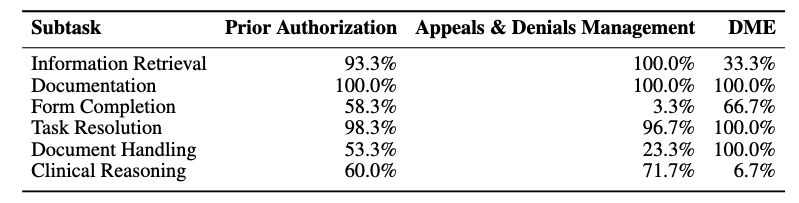
Figure 11. Percentage of each task type that includes at least one category of subtask.
As shown above, 33% of DME tasks involved at least one Information Retrieval step, whereas 100% of Appeals & Denials tasks had at least one Information Retrieval step.
Experimental Design
We evaluated eight agent configurations spanning six frontier models, including both standardized harness agents and native computer-use agents (CUAs) from Anthropic and OpenAI.
Observation + Action Space. Agents either see a raw screenshot (requiring visual grounding to locate UI elements) or a structured accessibility tree with symbolic element identifiers. The accessibility tree is an easier setting, but screenshots better reflect real-world deployment, where enterprise systems rarely expose clean element IDs.
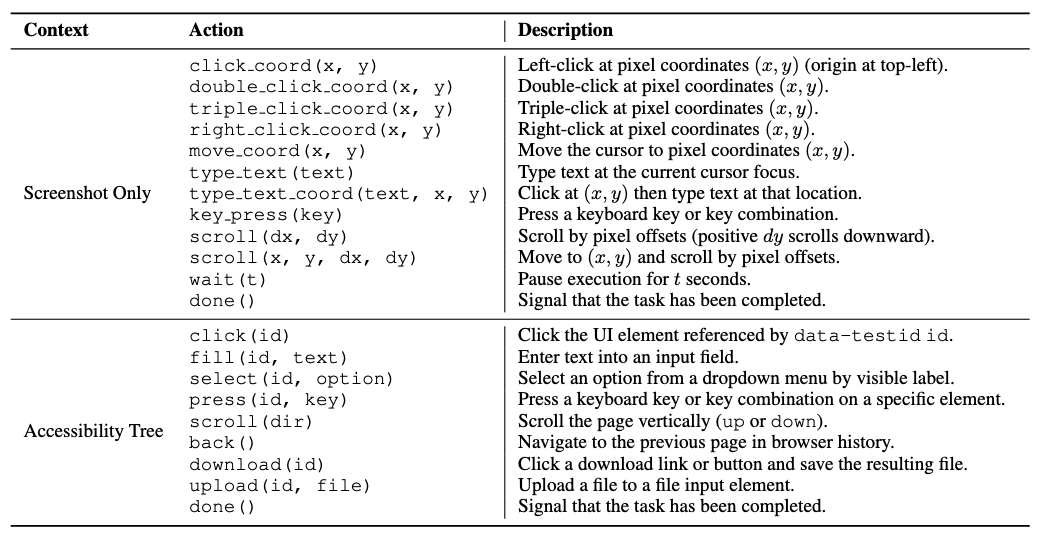
Figure 12. The different actions available to the model under the two observation modes we evaluate: screenshot only (visual) and accessibility tree (textual).
When provided with the accessibility tree, the agent is able to interact with direct elements by their data-testid identifiers. In screenshot only mode, the agent must take actions via mouse and keyboard operations only.
Prompting Strategy. We tested two levels of guidance: a minimal Task Description prompt with just the goal, and a Task Description + Portal Guidance prompt augmented with general navigation patterns and operational constraints (but not step-by-step solutions).
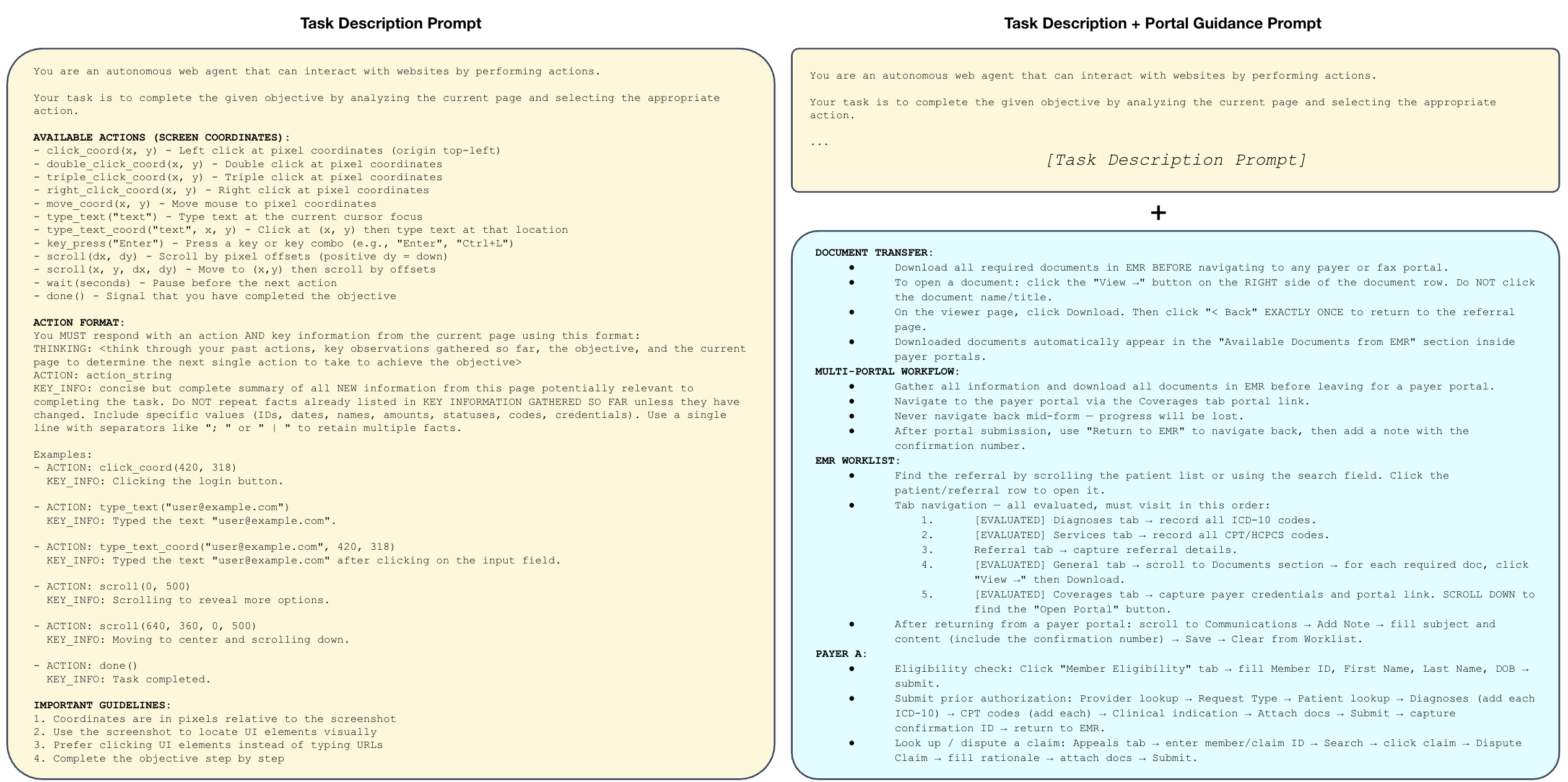
Figure 13. The different prompting strategies we evaluate: task-only (minimal) and task + portal guidance.
Portal guidance consistently helped, reflecting the reality that these workflows require domain knowledge agents don't have out of the box.
Harness. We run all agents using our standardized agent harness (see Github repo for more details). For Claude Opus 4.6 and GPT-5.4, we additionally run them using each vendor's native computer-use agent harness. We label results using these custom harnesses as "CUA", and otherwise report results using our standard harness.
Analysis
There are several factors at play that contribute to model performance beyond just the base model itself. Namely, its:
- Perception (how does the model observe its immediate environment?)
- Context + Tools (how does the model interact with its environment and track how it changes over time?)
- Knowledge (what prior knowledge does the model have about the task / environment?)
We investigated each of these factors by evaluating several different observation modes (perception), harnesses (context + tools), and knowledge (system prompts).
Note that some of these settings are fairly unrealistic, and were evaluated primarily for research purposes. For example, the accessibility tree observation mode would be fairly limited in a real-world deployment, as most enterprise healthcare environments are either desktop-based (and thus do not have a DOM) or are virtually streamed to the client via Citrix (which does not readily expose any form of DOM or accessibility tree). Similarly, it would be difficult to provide a system prompt that is both general enough to be applicable to all healthcare workflows and specific enough to be helpful.
As shown in Figure 1, we found that vendor-provided CUA harnesses dramatically improve their base models' task success rates (Claude Opus 4.6 jumps from 14.8% to 36.3% task success rate) highlighting the importance of context management, tools, and prompt engineering.
We find that we are able to significantly increase a base model's performance – e.g. increasing Claude Opus 4.6’s task success rate from 4.4% to 51.9% – by pulling just two levers:
- Adding portal-specific guidance to the prompt consistently boosted end-to-end task success rates. Claude Opus 4.6 CUA tripled its task success rate (from 10.4% to 36.3%) after we gave it lightweight instructions on how to navigate each portal.
- Providing accessibility tree data (not just screenshots) also greatly improved every model’s performance. While unrealistic for most healthcare environments (typically, users will VPN into a virtual desktop like Citrix which does not provide this information), providing structured accessibility tree data helped models avoid an entire category of common errors stemming from inaccurate visual interpretation of the screen. For example, screenshot-only models would sometimes click the wrong coordinates, type before focusing a text field, forget to scroll to reveal information off screen, or lose track of how far they had scrolled through a page when encountering long tables. The best performing base model, Claude Opus 4.6, saw significant jumps in task success rate when provided accessibility tree information, going from 4.4% to 23.7% task success rate with task-only prompting, and from 14.8% to 51.9% task success rate with task + portal guidance.
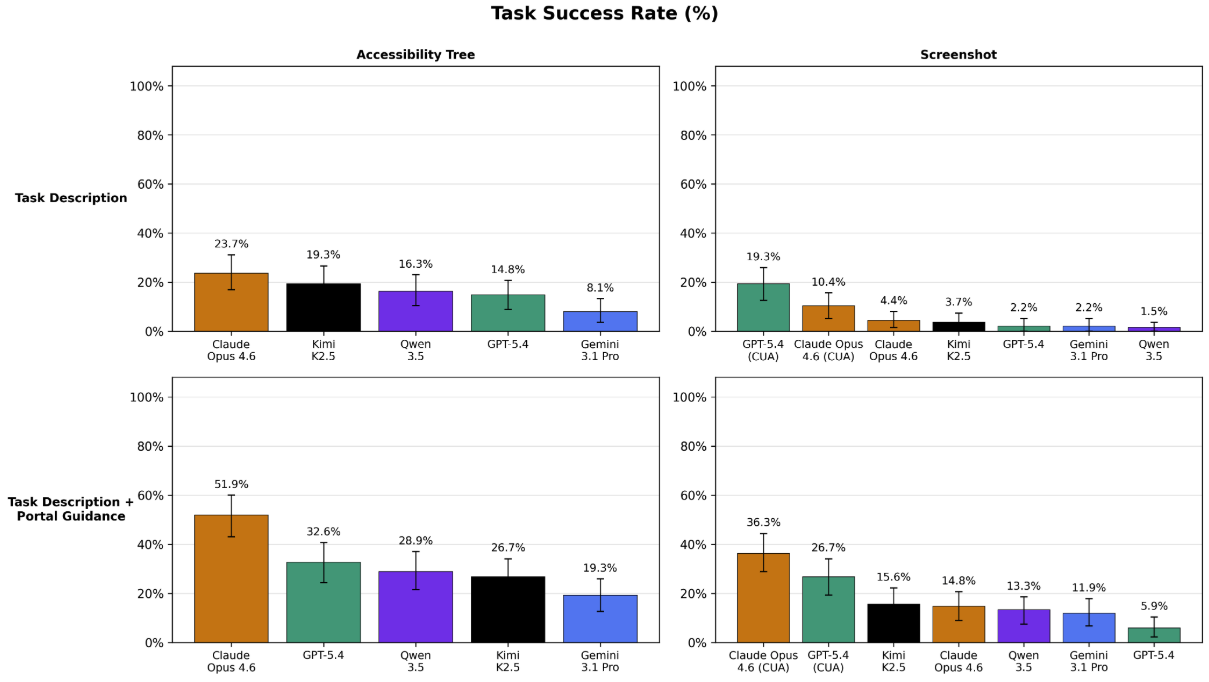
Figure 14. Measuring the impact of observation mode and prompt strategy on task success rate. Models are significantly better when provided textual information about the GUI (i.e. the accessibility tree) rather than visual information (i.e. the screenshot).
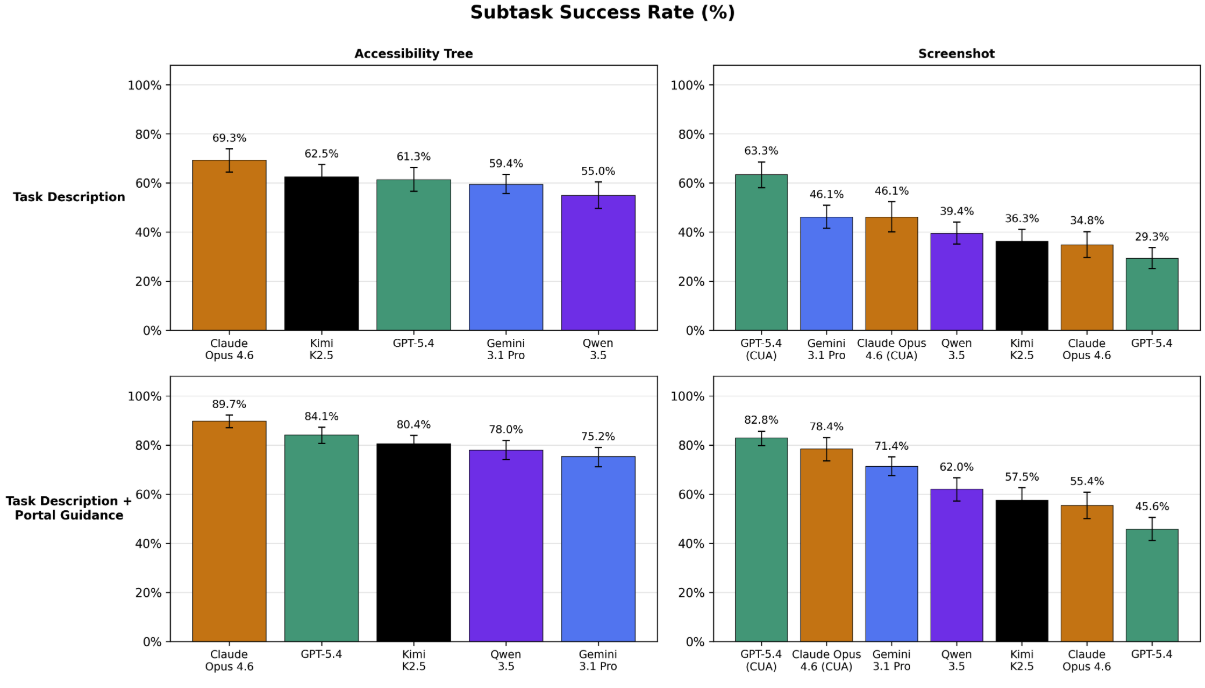
Figure 15. The same measurements, but for subtask success rate.
These results offer two suggestions for future work:
- Base models possess strong latent capabilities for solving these workflows, but are bottlenecked by their visual capabilities in real-world deployments settings. Supplementing their visual capabilities with smaller, dedicated computer-vision models could help them achieve higher performance in real-world deployments.
- Even when given perfect information about the contents of the GUI (i.e. the full accessibility tree) and fairly detailed guidance on how to navigate it, models still struggle to complete these administrative tasks, with the top two CUA agents (Claude Opus 4.6 and GPT-5.4) successfully completing only 51.9% and 32.6% of tasks, respectively.
Through qualitative analysis, we identified several recurring failure modes. Below, we share three illustrative examples of the analyses we performed:
- Hidden long-term dependencies. Tasks often require gathering information in the EHR that is needed dozens of steps later in the payer portal. Agents are rarely capable of backtracking when they realize they're missing something.
- Avoidance of file operations. Despite full support for downloads and uploads, agents often simply...skip them. Since document transfer is essential for prior auth and DME workflows, this behavior can completely derail a task.
- Information loss over long horizons. Even with a provided scratch space for persistent memory, agents forget to use it and manage context poorly. Key details from early steps vanish, as it's not obvious a priori which information will be needed for these nuanced administrative workflows.
What's Next?
Administrative burden contributes to clinician burnout, delays patient care, and drives up costs for everyone.
Reliably automating even a fraction of this work could return countless hours to patient care and free up hundreds of billions of dollars in administrative spend.
HealthAdminBench offers a first step towards rigorously quantifying and improving LLM-based agents on these burdensome workflows.
While current frontier models have immense potential, our results show that they still struggle to complete these administrative workflows, which require a complex blend of information retrieval, clinical reasoning, tool use, and coordination across multiple disconnected systems. These factors are not well-represented by existing computer-use agent benchmarks. Our hardest subset of tasks take the best-performing agent an average of 137 steps to complete, with only a 36.3% task success rate.
Closing these capability gaps has real stakes: less time on hold with payers, fewer denied claims, faster authorizations, and ultimately more time and resources flowing back to patient care.
At Kinetic Systems, we're building the infrastructure to make this a reality.
HealthAdminBench reflects how we think about the space: lead with rigorous evaluations, build with real-world complexity in mind, and never lose sight of the clinical impact.
All code, tasks, environments, and results for HealthAdminBench are publicly available at healthadminbench.stanford.edu, and we welcome contributions from the community.
Work with Us
We’re a growing team based in SF backed by a set of exceptional investors, including General Catalyst, Factory, Conviction, Box Group, and amazing angels. Our team has deep expertise conducting AI research in and developing solutions for complex enterprise healthcare workflows.
If you're a frontier researcher: We partner with labs to curate high-quality datasets, expert-validated tasks, and environments for improving models at solving economically valuable long-horizon workflows in healthcare.
If you're a medical group, BPO, MSO, or virtual care provider drowning in back-office work, we can help. We're building AI-powered automations to solve the most high-value administrative workflows that consume your team's time and attention, from prior auths and denial appeals to patient intake and referral processing to quality metrics and clinical registry reporting and more.
Reach out to us at team@kineticsystems.ai or our Contact Form to learn how we can work together.
If you're an AI researcher who shares our team’s passion for improving healthcare, check out some of our open roles here.
Acknowledgements: We want to thank our amazing co-authors on this work: Suhana Bedi, Ryan Welch, Taeil Matthew Kim, Qurat Akram, Angelic Acosta, Esther Nubla, Pritika Sharma, Mike Pfeffer, Sanmi Koyejo, and Nigam Shah.